SF BIKE Getting Started Guide
From first spawn to free motorcycle, first Cash, and a clear next destination.
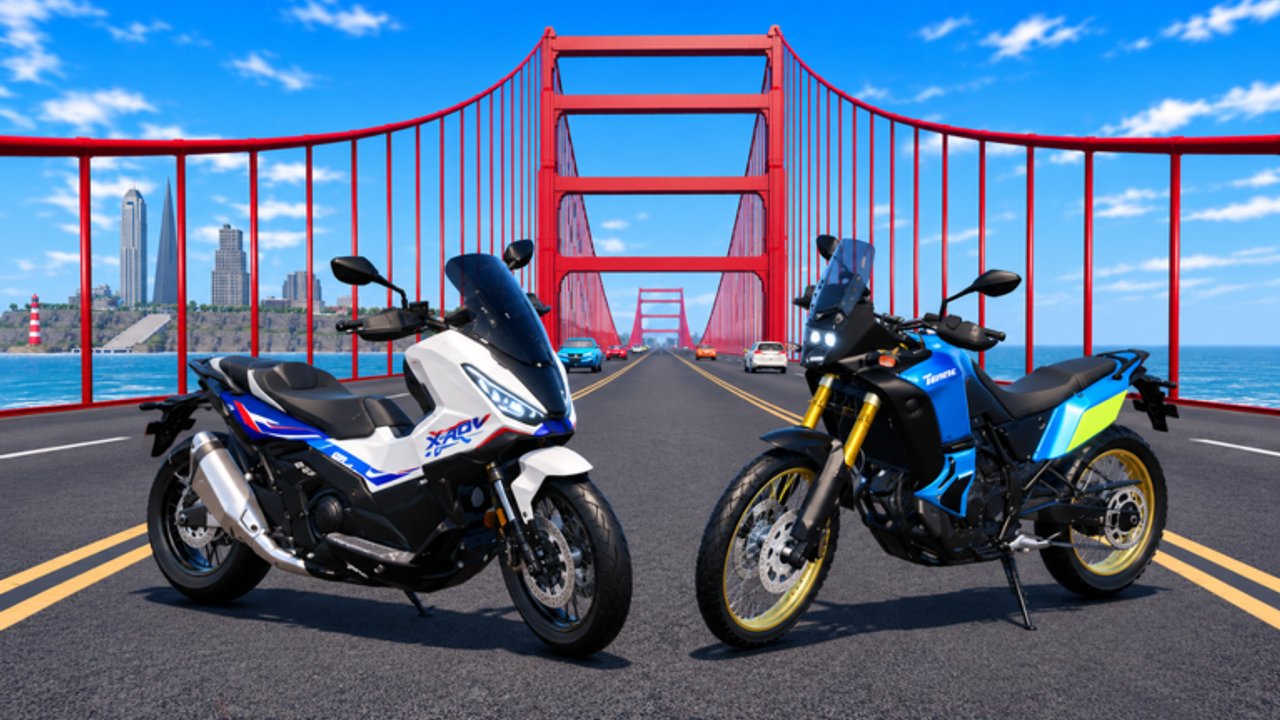
SF BIKE is a free Roblox open-world riding game set in San Francisco. You hop on motorcycles, scooters, and BMX bikes, earn Cash by riding, buy and customize vehicles at the dealership, and share servers with up to 20 players. The experience launched on 12 October 2026. This Getting Started guide is the day-one checklist: spawn cleanly, claim every free boost, learn the Cash loop, and leave with a plan instead of circling the same block for an hour.
Step 1 — Load in and look around
Join from the official place page and wait until the city finishes streaming. Note the on-screen buttons on the right side of the HUD; Settings is the door to graphics options and the Codes tab. Do not sprint into traffic until you know how to open those menus — missing a visit-milestone code because you rode away for twenty minutes is a common first-session mistake.
If the camera feels wrong, pause and adjust sensitivity or shift-lock style options before you commit to a long ride. The dedicated Controls page covers PC and mobile inputs in more detail, including honest notes that exact vehicle keybinds can follow standard Roblox patterns and may differ slightly by device or patch.
Step 2 — Redeem active codes immediately
Open Settings → Codes, then enter each working string exactly as written. As of mid-November 2026, the big Cash drops players hunt are:
- 1MILLIONVISITS — 8500 Cash
- 700KVISITS — 7500 Cash
Together that is 16,000 Cash before you have ridden a single productive loop. Codes are case-sensitive and expire without much warning when the developer retires a milestone. Always re-check the live list on the Codes Hub and follow the illustrated steps on How to Redeem if the UI looks different after a patch.
Step 3 — Join the SF BIKE group for a free motorcycle
The official Roblox group advertises a free motorcycle for members. Join the group from the community page tied to the experience, then return to the game and claim or equip the reward through the in-game vehicle flow. That free bike is separate from promo codes: codes pad your wallet; the group perk pads your garage. New players who skip the group waste early Cash buying a motorcycle they could have unlocked for free.
Step 4 — Take your first intentional ride
Cash accrues while you ride, so the earliest minutes should be continuous motion rather than standing in a menu. Leave the spawn and dealership area on a stable class — often the free group motorcycle or a starter scooter/BMX — and pick a landmark destination. The Golden Gate Bridge with live traffic is the postcard route most players try first; skateparks and side streets teach handling before you chase top speed. Use Map Locations as a sightseeing checklist once you know the basic throttle and brake.
Ride smoothly through hills and intersections. Crashing into live traffic looks funny once; repeating it slows Cash and wastes the session. If you prefer tricks and bowls, swing toward a skatepark early so you learn whether BMX-style handling fits your playstyle before you dump Cash into a pure highway motorcycle.
Step 5 — Understand Cash basics before you spend
Cash is the main currency for dealership purchases and customization. Codes give lump sums; riding gives the ongoing drip. Resist the urge to empty the wallet on the first shiny paint job. Early priorities usually look like this:
- Confirm the free group motorcycle is claimed.
- Keep a Cash buffer after code redemption.
- Buy the next vehicle only when it clearly improves the route you actually ride (speed for bridge loops, handling for hills and parks).
- Save cosmetic spending for after your main ride feels good — details live in Customize Rides.
For a deeper farming plan, open Earn Cash Fast. That page also embeds a community video walkthrough for codes and money routes; keep it as the mid-session reference once this checklist is done.
Step 6 — Visit the dealership with a goal
The dealership is where Cash becomes a new motorcycle, scooter, or BMX. Browse classes with your playstyle in mind instead of memorizing temporary SKU names — NEW BIKES patches refresh the catalog. When you are ready to compare options, use the Tier List Hub and Best Bikes for S/A/B/C-style advice by class and role (touring, tricks, beginner value, Cash efficiency).
Step 7 — Play with others and stay current
Servers cap at 20 players. Cruising with friends makes map learning faster and turns Golden Gate traffic into a shared spectacle. Check the Players Hub for social tips, and skim Updates after patches so you know when new bikes or UI changes landed.
Where to go next
| Goal | Open this page |
|---|---|
| Full code list and redeem steps | Codes, How to Redeem |
| Faster Cash loops | Earn Cash Fast |
| Inputs and menus | Controls |
| Landmarks and hidden spots | Map Locations |
| Garage and cosmetics | Customize Rides |
| What to buy next | Tier List, Best Bikes |
| Riding with friends | Players |
Finish this page, claim codes and the group bike, ride one deliberate loop, then pick the row that matches your next question. That is a complete first hour in SF BIKE.
Frequently Asked Questions
Quick answers for codes, free bikes, Cash, and updates.
What should I do first in SF BIKE?
Open Settings → Codes, redeem active codes like 1MILLIONVISITS and 700KVISITS, join the official group for the free motorcycle, then take a short intentional ride.
How do I get the free motorcycle?
Join the official SF BIKE Roblox group advertised on the experience page, then return in-game to claim or equip the member motorcycle reward.
How do I earn Cash as a beginner?
Ride continuously through the city after redeeming codes. Cash accrues from riding; codes are a lump-sum boost, not a replacement for motion.
Should I buy a bike immediately?
Claim the free group motorcycle first and keep a Cash buffer. Buy only when a class clearly fits the routes you ride, using the tier list for guidance.
Where are codes redeemed?
Use Settings → Codes inside the game. See How to Redeem and the Codes Hub for the current list and exact UI steps.